- What are negative keywords in Google Ads?
- What negative keywords should a contractor add first?
- What are the negative keyword match types?
- Where should you add negatives: account, campaign, or ad group?
- How do you find negatives from the search terms report?
- How do negatives work in Performance Max and AI Max?
- What negative keyword mistakes cost contractors money?
- Get the contractor negative keyword master list (free, ungated)
- FAQ
What are negative keywords in Google Ads?
A negative keyword is a word or phrase you add to stop your ad from showing on searches that include it. It is the opposite of a normal keyword. A keyword says “show my ad here”. A negative keyword says “never show it here”. It is the cheapest, fastest way to cut wasted spend. It stops you paying for clicks that were never going to book a job.
Think about what a loose search campaign attracts without them. People hunting for jobs. People wanting to do it themselves. People after free advice or the cheapest possible price. People searching a service you do not even offer. Each of those clicks costs the same as a real buyer’s. In roofing, that is a median of $10.70 a click. Block them and that budget stays aimed at people ready to hire.
This is usually the first thing we fix in a leaking account. It is not glamorous. It is just the highest-return hour you will spend. What a wasted click is really costing you is covered in our real numbers on what Google Ads cost.
What negative keywords should a contractor add first?
Before you spend a dollar, block the six categories that waste money in almost every home-services account: job seekers, do-it-yourselfers, free and cheap shoppers, researchers and students, parts and retail shoppers, and services you do not offer. These six catch the bulk of obvious waste on day one. The full copyable list is further down this page.
- Careers. “jobs”, “salary”, “apprenticeship”, “hiring”. People looking for work, not work done.
- Do-it-yourself. “how to”, “diy”, “yourself”. They want to fix it themselves.
- Free and cheap. “free”, “cheap”, “discount”. Price shoppers who rarely book at a fair rate.
- Research and study. “course”, “training”, “what is”, “meaning”. Students and browsers.
- Parts and retail. “parts”, “supplies”, “for sale”, “home depot”. They want to buy a product, not hire you.
- Wrong service. A plumber blocking “electrician”, a roofer blocking “gutter cleaning” they do not offer.
The last category is personal to your business. Only you know which jobs you turn down. Build the positive keyword list and this negative list side by side. If you are still finding your keywords, start with our guide to keyword research for home-services Google Ads.
What are the negative keyword match types?
Negative keywords have their own three match types, and they do not behave like normal keywords. Negative broad blocks a search only if it contains all your words, in any order. Negative phrase blocks only when your words appear together, in order. Negative exact blocks only the one precise search. The big catch: negatives do not match close variants. Google says it plainly, so your ad can still show on searches that use a close variation of the word you blocked.[2]
Here is one negative keyword, water filter, shown across all three types. Picture a plumber who fixes leaks but does not install water filters.
| A search | Negative broad water filter | Negative phrase "water filter" | Negative exact [water filter] |
|---|---|---|---|
| water filter | Blocked | Blocked | Blocked |
| water filter installation | Blocked | Blocked | Shows |
| filter for water | Blocked | Shows | Shows |
| water heater repair | Shows | Shows | Shows |
Read the pattern. Negative broad is the workhorse: it blocks any search with both words, so it cleans a whole theme. Negative exact is a scalpel: it blocks one search only, and lets every variation leak through. Negative phrase sits between them, blocking the words in order but missing reorders like “filter for water”.
Three gotchas that catch people out:
- Plurals and synonyms are separate. Blocking “job” does not block “jobs”. Add both. Blocking “hire” does not block “employment”. Add the words you mean, one by one.
- Casing and misspellings are handled for you. This one goes the other way, and it saves you work. Google says negative keywords already account for capital letters and misspellings, so you do not need to add those separately.[2] Spend your effort on plurals and synonyms instead.
- Order matters for phrase. A negative phrase only fires when the words appear together in order. Reordered searches slip past it.
Default to negative broad for cleaning themes, like careers or DIY. Save negative exact for surgical jobs, like blocking one specific converting-adjacent term without touching its neighbours. The general, positive match types are a separate topic, covered in our keyword match types guide.
Where should you add negatives: account, campaign, or ad group?
You can add negatives at three levels, and each has a job. Account-level negatives apply everywhere at once, so they suit universal junk like careers and DIY. Campaign-level negatives suit terms you want gone from one campaign but not another. Ad-group-level negatives stop your own ad groups from stealing each other’s searches. Match the level to how wide the block should reach.
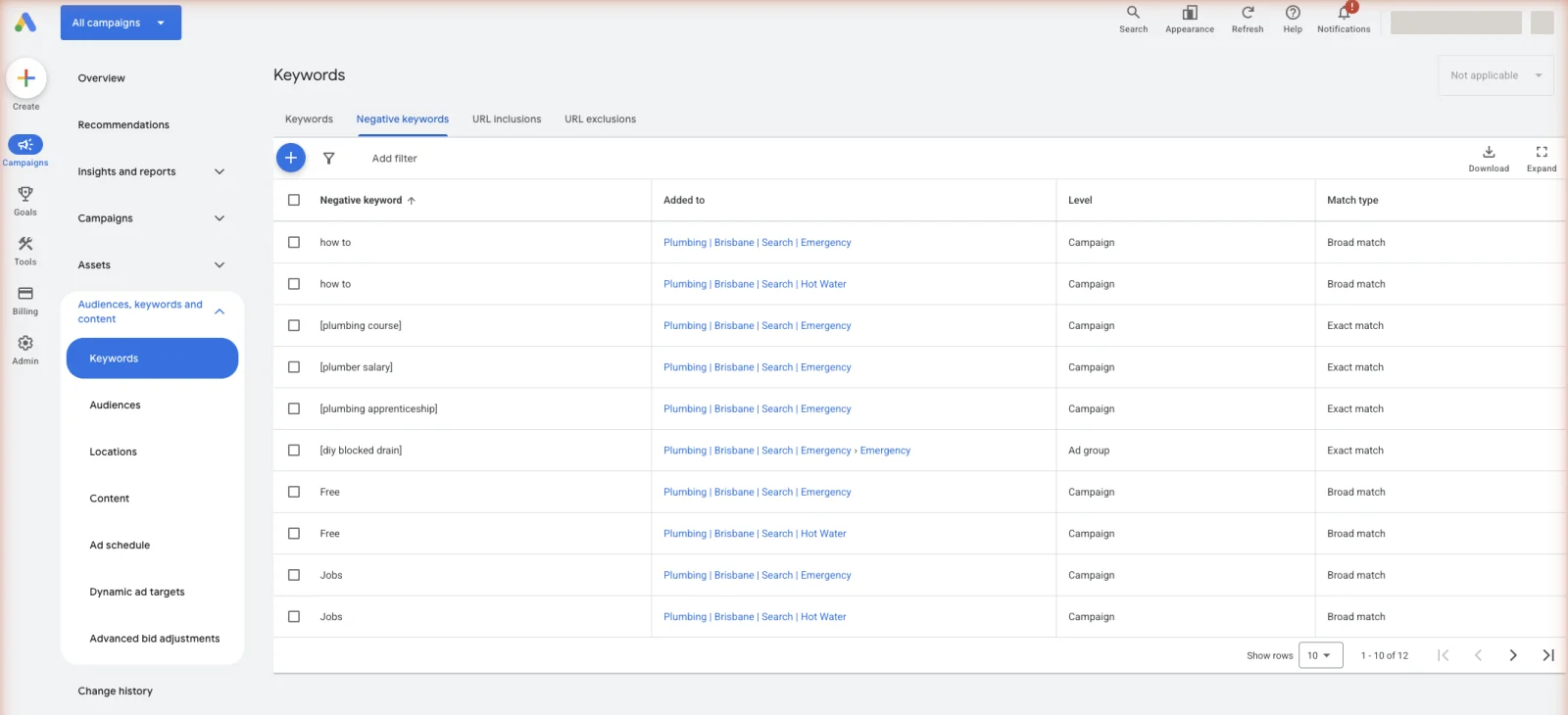
- Account level. This is a real setting, and it is the one most owners miss. Click the Admin icon, open Account Settings, and open the Negative keywords section. Anything you put there is blocked across the whole account. Google allows up to 1,000 of them, and they cover Search, Shopping, Performance Max, App, Smart and Local campaigns.[3] Your careers, DIY, and free-and-cheap blocks belong here.
- Campaign level. Use for a block that belongs to one campaign only. For example, keep “repair” out of a campaign built purely for new installs.
- Ad group level. Use to keep tightly themed ad groups from overlapping. Block “installation” inside your “repair” ad group so each shows the right ad.
There is a fourth thing that sounds like the first one but is not. A negative keyword list is a saved list you build once and then apply to the campaigns you choose. It is not automatically account-wide. You get up to 20 lists, holding up to 5,000 terms each.[4] Lists are the right tool when a block should cover most campaigns but not all of them. The account-level setting is the right tool when a block should cover everything, full stop.
Most contractors need just two: the account-level junk list, and a few ad-group negatives to stop internal overlap. Start there. Add campaign-level blocks only when a real need shows up.
How do you find negatives from the search terms report?
Your best source of new negatives is not a list someone else wrote. It is your own search terms report, which shows the actual searches that triggered your ads. Once a week, open it, sort by spend, and look for searches that cost money but had no chance of booking. Each one you find becomes a negative. This weekly pass is the single most reliable way to keep an account clean.
The routine is short. Filter to the last week. Sort by cost, highest first. Read down the list. Anything irrelevant gets added as a negative on the spot, usually as negative broad or phrase. Anything that booked work gets promoted to a real keyword. Block the junk, promote the winners, close the report.
It takes ten minutes, so put it in someone’s week rather than hoping you get to it. Your office manager can do this. They know the difference between a real customer and a time-waster better than any software does. If an agency runs the account, ask them to send you the searches they blocked each month. A real answer is a list of actual searches. “We optimised the account” is not an answer. That list is the plainest proof that somebody is actually pruning the account rather than watching it run.
The full method, including how to read the match-type column and handle the hidden terms, lives in our weekly-ritual guide to reading the searches you actually paid for. The master list below stops the obvious waste. Your search terms report stops the waste no list could predict.
How do negatives work in Performance Max and AI Max?
This has improved a lot, and old guides will tell you otherwise. Performance Max used to give you almost no negative keyword control. Now you add negative keywords to a Performance Max campaign just as you would to any campaign. You can apply your saved negative keyword lists to it as well.[5] Google’s campaign limit is 10,000 negative keywords, so you will not run out.[4] Your account-level negatives cover it too. The one limit worth knowing: in Performance Max, negative keywords only work on Search and Shopping inventory, not on the display or video side.
AI Max is the newer one to ask about, because Google is switching it on across Search. AI Max lets Google match searches well beyond your keyword list, which sounds like a loss of control. It is not, as long as you keep your negatives current. Google’s own answer is short and clear: negative keywords are still respected when AI Max is turned on.[6] That makes your negative list more important than it was, not less. It is now the main hand brake you still hold.
So the honest position is this. Both Performance Max and AI Max trade some control for reach, and both still obey your negatives. Keep one strong account-level junk list so every campaign type inherits it. Then read your search terms report weekly, because looser matching means new junk arrives faster than it used to. The full picture is in our Performance Max guide.
What negative keyword mistakes cost contractors money?
The biggest mistakes are not missing negatives. They are the wrong ones. Over-block and you shut out real buyers. Set the list once and never touch it and it goes stale. Use the wrong match type and you either miss the junk or block too much. Ignore plurals and singulars and half your blocks quietly fail.
- Over-blocking active searches. Blocking “cost” or “quote” as junk feels tidy, but those are buyers. Blocking a competitor’s name that is also a common word can shut down real traffic. Check a negative against your search terms before you add it wide.
- Never updating the list. A negative list is a living thing. New junk shows up every week. A list nobody has touched in ninety days is leaking money right now.
- The wrong match type. A negative exact that should have been negative broad lets every variation through. A negative broad that is too aggressive blocks searches you wanted.
- Ignoring plurals and synonyms. “job” without “jobs”. “hire” without “employment”. Negatives do not match close variants, so add these yourself or they slip past. Casing and misspellings are the exception, and Google covers those for you.
The fix for all four is the same weekly habit: review the search terms report, add and adjust, and sanity-check any wide block before it goes live.
Get the contractor negative keyword master list (free, ungated)
Here is the master list. No email, no opt-in, no download wall. Put the universal junk straight into your account-level negatives, under the Admin icon, in Account Settings. That covers every campaign at once, including Performance Max. Add most terms as negative broad. Then keep pruning from your own search terms report. If you go past the 1,000-term account limit, move the overflow into a saved negative keyword list and apply it to your campaigns.
job, jobs, salary, salaries, wage, wages, career, careers, hiring, apprentice, apprenticeship,
trainee, resume, cv, vacancy, vacancies, recruitment, employment, "help wanted", "how to become",
union, "job description", intern, internshipdiy, "do it yourself", "how to", "how do i", "how can i", yourself, homemade, "step by step",
tutorial, tutorials, youtube, video, videos, "fix my own", instructionsfree, freebie, gratis, cheap, cheapest, "low cost", discount, discounts, coupon, coupons,
voucher, vouchers, deal, deals, bargain, "for free", giveawaycourse, courses, class, classes, training, school, college, university, certification, certificate,
diploma, definition, meaning, "what is", "what are", "what does", wiki, wikipedia, reddit, forum,
quora, examples, "images of", "pictures of", history, salaryparts, part, supplies, supply, wholesale, supplier, suppliers, manufacturer, equipment, tool,
tools, rental, rent, "for sale", used, "second hand", secondhand, "home depot", lowes, bunnings,
screwfix, amazon, ebay, warehousescam, scams, lawsuit, sue, "class action", complaint, complaints, ripoff, "rip off", fraud, bbb,
"better business bureau"Blocking cost, price or quote outright. Someone searching “water heater replacement cost” is pricing a job they intend to buy.
Blocking job, salary, diy or free. Nobody searching those is about to book a paid callout.
cost, price, prices, quote, near me, reviews, best, insurance, warranty, license, licensed, cheapDo not add the line above blindly. “Cost”, “price”, and “quote” are buying words. “Cheap” only belongs on your junk list if you truly do not want price shoppers. Some volume shops keep them.
Plumbing: "plumbing supplies", "plumbing school", "master plumber", "plumber jobs", plunger
HVAC: "hvac certification", "epa 608", "hvac school", "furnace filter", "how to reset thermostat"
Roofing: "roofing materials", "shingles for sale", "how to shingle", "roofing jobs", "roof rake"
Restoration: "mold test kit", "dehumidifier for sale", "how to dry a carpet", "restoration hardware",
  "water damage course"
Windows and doors: "window cleaning", "window tint", "blinds", "curtains", "garage door",
  "how to replace a window"
Foundation and waterproofing: "foundation makeup", "waterproof paint", "sump pump for sale",
  "how to seal a crack", "foundation repair training"
Two of those are worth a look, because they catch money most owners never notice going. A restoration company pays for “restoration hardware” clicks from people shopping for furniture. A foundation repair company pays for “foundation makeup” clicks from people buying cosmetics. Neither searcher will ever hire you, and both cost you full price. Blocks like these are the first thing we write when a restoration account is buying clicks that were never a job.
Also block the trades you do not offer. A plumber who does not do HVAC blocks “air conditioning” and “furnace”. A roofer who does not clean gutters blocks “gutter cleaning”. Your turned-down jobs are somebody’s wasted click.
Stop reading · start fixingSee where your pipeline is leaking.Free 15-minute Leak Finder. We pull up your numbers, name your biggest leak, and hand you a 90-day plan. No sales script, no hard close.Find My Google Ads LeaksFAQ
What are good negative keywords? Good negative keywords block searches that can never book a job: careers terms like “jobs” and “salary”, do-it-yourself terms like “how to” and “diy”, price terms like “free” and “cheap”, research terms like “course” and “what is”, and any service you do not offer. Start with the master list above, then add your own from the search terms report.
How often should I update my negative keyword list? Weekly on an active account. New junk searches show up every week, and expensive trade clicks mean stale lists leak money fast. Open your search terms report, sort by cost, and add any irrelevant term you find. Monthly is too slow when a single wrong click can cost ten dollars or more.
Can negative keywords hurt my performance? Yes, if you over-block. Adding buying words like “cost”, “quote”, or “price” as negatives shuts out real customers. So can a competitor block that is also a common word. Before you add a wide negative, check it against your actual search terms to be sure it is only catching junk, not blocking jobs.
What is the difference between a negative keyword and a keyword? A keyword tells Google which searches should trigger your ad. A negative keyword tells Google which searches should never trigger it. Keywords bring traffic in. Negatives keep the wrong traffic out. You need both. A keyword list without negatives pays for every loose match Google decides to try.
How many negative keywords should I have? There is no target number. A clean account might run a shared list of a few hundred universal blocks, plus a handful of ad-group negatives to stop internal overlap, plus new ones added weekly from the search terms report. Quality beats quantity. One well-placed block on a costly junk theme saves more than fifty random ones.
- 1. LocaliQ, 3,211 US campaigns, April 2024 to March 2025
- 2. Google Ads Help, “About negative keywords” ↩
- 3. Google Ads Help, “About account-level negative keywords” ↩
- 4. Google Ads Help, “About your Google Ads account limits” ↩
- 5. Google Ads Help, “Negative keywords in Performance Max campaigns” ↩
- 6. Google Ads Help, “Frequently asked questions about AI Max for Search campaigns” ↩
- 7. SearchLight, January 2026, 816 contractors, $14.9M spend


