
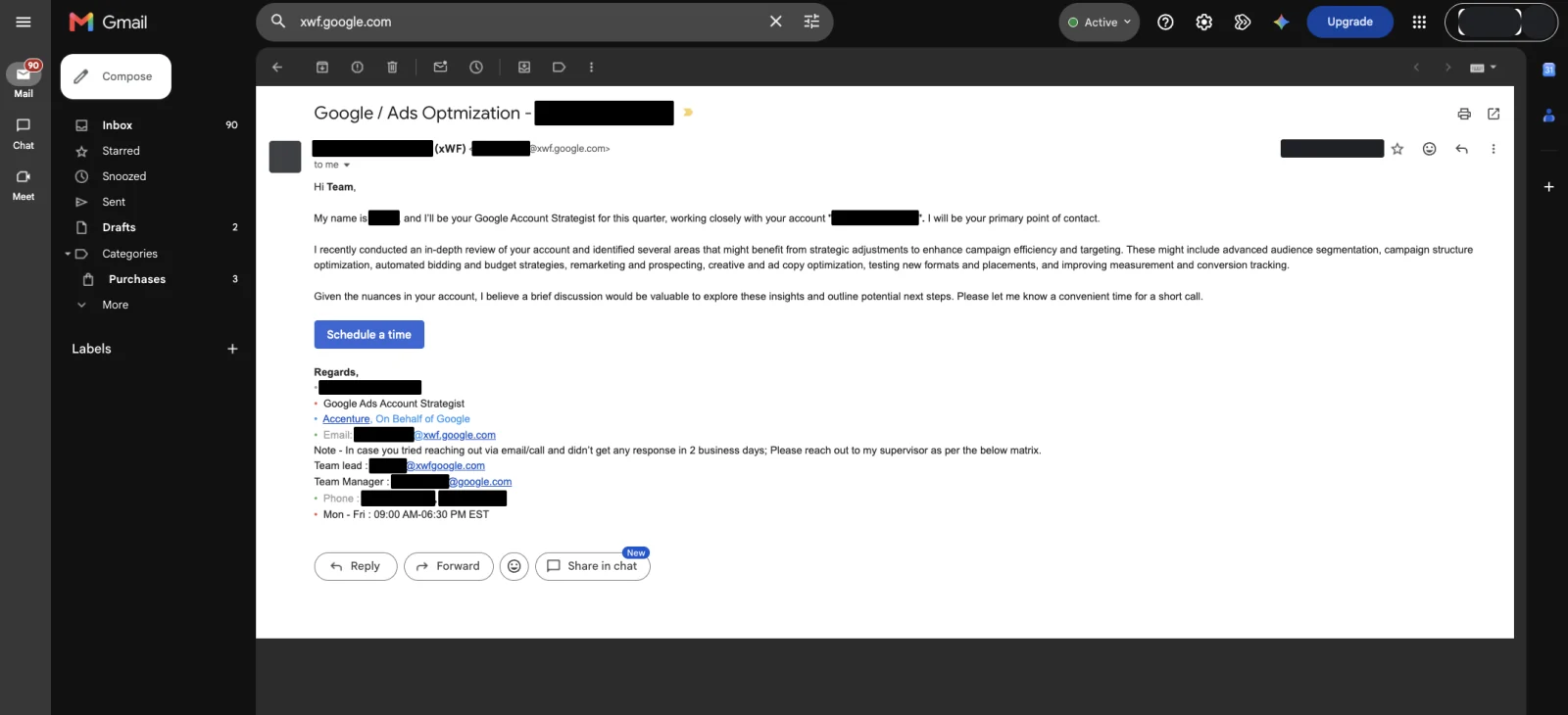
- What is an @xwf.google.com email?
- Who is actually calling you?
- Is it a scam, and how do you tell?
- Why does the advice always point at spending more?
- What do they usually ask for, and what should you check first?
- What should you say on the call?
- How do you check whether a suggestion is right for you?
- When is a Google rep actually worth listening to?
- How do you stop the calls and emails?
- FAQ
What is an @xwf.google.com email?
It is a real Google address. XWF stands for extended workforce. Google’s own documentation spells it out. Staff at its suppliers and staffing partners are part of that workforce. Their email ends in the unique domain @xwf.google.com. So the domain is not a forgery, and on its own it is not a warning sign.
Google goes further and tells you to use it as a check. Its third-party partners page says to always check carefully who you are dealing with. It says you can do that by asking them to send you an email. Then it gives you the test: “Google representatives always have an email address that ends with @xwf.google.com.”
Who is actually calling you?
Not a Google employee, in most cases. Google’s help pages name third-party partners who “work on behalf of Google to help new advertisers start and optimize their campaigns.” The named firms are large outsourcing and call-centre companies. Accenture, Atento, Cognizant, Concentrix, Regalix/Marketstar, TDCX/Teledirect, Teleperformance, TMJ, TTEC and WNS are all on Google’s list.
Google’s other page on this is titled “About Google Ads sales representatives.” It calls them authorized third parties. Read that title again. Sales is Google’s word, not ours. The person on your phone works in sales, for a vendor Google pays.
That is worth knowing without being an insult. Somebody in a call centre with a target is not a villain. They are just not your account manager, and they have never seen your job board.
Is it a scam, and how do you tell?
The @xwf.google.com call is usually real. Actual scam calls about Google Ads exist too, and they behave differently. The split is not about how pushy the caller is. It is about what they ask you for.
| What you see | A real Google rep | An actual scam call |
|---|---|---|
| The address they email from | Ends in @google.com, @ads.google.com or @xwf.google.com | A lookalike domain, or a free mailbox |
| Putting it in writing | Happy to email you, that is Google’s own suggested check | Avoids it, wants to keep you on the phone |
| Your password or codes | Never asks | Asks for your password or a verification code |
| Payment | Handled in your account, not on a call | Wants card details or a payment now |
| Urgency | Books another call | Says your account is about to be shut off today |
Google’s documented line is narrower than that table, so here is what is Google’s and what is ours. Google says it will never send you an out-of-the-blue message asking for your password or other sensitive details. It says real Google email comes from @google.com or @ads.google.com. And it says you can check a caller by asking them to email you.[2] The card rule is ours, not Google’s. No genuine rep needs your card on a phone call.
If it turns out to be fake, do not argue with them. Google has forms for reporting a suspicious email or call, and using them is faster than a fight.
Why does the advice always point at spending more?
Google does not publish how these reps are scored, so we are not going to pretend we have seen the scorecard. What we can see is the advice. Across a lot of accounts it lands in the same place: raise the budget, widen the match types, switch more of it over to automation.
That is what a sales role looks like from the outside. The product is ad spend and automation, so the pitch is ad spend and automation. It is not misconduct and it is not a conspiracy. It is a different job to yours. You get paid when a crew is on a job. They do not, and they never see whether the phone rang.
So treat the call the way you would treat a supplier rep who wants you to carry more stock. Maybe he is right. He is still not the one making payroll on Friday.
Now put the same test on us. We sell Google Ads management judged on booked jobs, so we have an incentive too, and this page is not neutral. The check does not change. Ask what we get paid on. Ask whether the advice on this page would still hold if we did not. And run anything we tell you past your own cost per booked job before you act on it, exactly as you would with a rep on the phone. Advice you cannot test is worth the same from anyone, us included.
What do they usually ask for, and what should you check first?
Almost every call lands on one of six asks. None of them are automatically wrong. Each one has a number in your own account that decides it.
| The ask | What it actually does | Check this first |
|---|---|---|
| “Raise your daily budget” | Buys more clicks at roughly your current cost per lead | Is the campaign actually limited by budget, and is your cost per booked job good enough that you want more of it? |
| “Add broad match” | Opens your ads to searches you did not choose | Your search terms report. Look at what the loose matching already drags in |
| “Move to Smart Bidding” or “lift your Target CPA” | Google bids toward a target you set | Does your conversion tracking count booked jobs, or form loads and hang-ups? |
| “Turn on AI Max” | A setting inside a Search campaign that widens what your ads can match to | The same tracking question, then the search terms it starts bringing in |
| “Apply these recommendations” | Pushes changes from the recommendations page into your account, sometimes automatically | Whether auto-apply is switched on. Recommendations has the off switch |
| “Add a Performance Max campaign” | One campaign across most of Google’s surfaces | Whether you will still be able to see where the money went. See Performance Max |
The budget one deserves a warning of its own. If a campaign says Limited by budget and you are on a target-based bid strategy, raising the budget gets you more delivery at your target. It does not make each lead cheaper. So the honest version of that call is “spend more to get more,” which is fine if the maths works and useless if it does not. Run it through how much you should actually be spending before you say yes.
What should you say on the call?
Be polite and be boring. You are not trying to win the call. You are trying to end it with nothing changed and everything in writing. Five lines cover almost every version of it.
- “Can you send that to me in an email?” Google itself suggests this as the way to check who you are talking to, so it is not rude.
- “What is your name, and what address are you sending from?” Write it down.
- “I don’t agree to anything on a call. Send it over and I’ll check it against my numbers.”
- “Please don’t apply anything to the account. If I want it, I’ll apply it myself.”
- If they ask for access to your account, or for anything to do with payment, the answer is no. Then hang up and go make a coffee.
After any call, open your change history and look. It takes thirty seconds and it tells you whether anything moved. Do the same the week after, because auto-apply can keep working long after the call ended. While you are in there, the settings that leak money without anyone phoning you are worth the same thirty seconds.
How do you check whether a suggestion is right for you?
Take the suggestion out of Google’s language and put it into yours. Three questions do it, and all three are answered by numbers you already have.
Then test it properly. Change one thing, on one campaign, and give it enough time and enough clicks to mean something. Judge it on booked jobs and cost per booked job, never on clicks or impression share. If the change wins, keep it and thank the rep. If it does not, you have learned something the call could not tell you.
When is a Google rep actually worth listening to?
Sometimes they are the fastest route to a fix, and pretending otherwise would be dishonest. They can see account-level things you cannot, and they can move a stuck problem faster than the support queue.
Good reasons to take the call: a disapproved ad you cannot get explained, a billing problem, a suspension you need moved along, or a second opinion on a setting you were already leaning toward. If you are dealing with a shut-down account, account suspended covers what to do while you wait.
Weak reasons: strategy, budget levels, what your business needs next. That advice needs to know your close rate, your ticket size, your capacity and your seasonality. None of that is on the rep’s screen.
How do you stop the calls and emails?
You can turn most of it off in the account. Click the Admin icon, then Notifications. The Notification topics column lists the types of email you can get, and the Email settings column is where you change each one.
Three topics matter here. “Google Ads Expert guidance” is the personal advice from an assigned expert. The other two are “Customized help and performance suggestions” and “Special offers.” Google says you can opt out of these altogether. The setting covers your email address across all of your linked Google Ads accounts, so you only do it once.
Two honest limits. Turning off the email does not stop the phone. And if a rep already has your mobile number, that number is out there now. The account setting is the lever you actually control.
Stop reading · start fixingSee where your pipeline is leaking.Free 15-minute Leak Finder. We pull up your numbers, name your biggest leak, and hand you a 90-day plan. No sales script, no hard close.Find My Google Ads LeaksFAQ
Is @xwf.google.com a real Google email address? Yes. Google’s own documentation says staff at its suppliers and staffing partners are part of its extended workforce. Their email ends in @xwf.google.com. Google Ads Help says the same thing from the other side. Its reps always use that domain, and asking for an email is how you check who you are talking to.
Do Google Ads reps work for Google? Usually not directly. Google calls them authorized third parties. It lists big outsourcing firms as its partners, among them Accenture, Concentrix, Teleperformance, TTEC and WNS. They work on Google’s behalf, on Google’s systems, from a Google domain. The pay cheque comes from the vendor.
Will Google punish my account if I say no? Nothing in Google’s documentation ties your account standing to taking a rep’s advice. Declining a suggestion is a normal thing to do. Your account is judged on policy compliance and billing, not on whether you raised your budget when asked. Say no plainly, and keep the reply in writing.
Should I give a Google rep access to my Google Ads account? No, not on a cold call. There is no upside you cannot get another way, and a change applied by someone else is a change you did not see. If you want their help with a specific problem, ask for the steps in an email and make the change yourself, then check your change history afterwards.
Is everything they suggest wrong? No, and treating it that way costs you. Some reps are genuinely competent, and some suggestions are the same ones a good operator would make. The rule is not “ignore them.” The rule is never to agree on the call, and to check every suggestion against your own cost per booked job before you touch anything.


