
- What is offline conversion tracking (and why a contractor needs it)?
- What counts as an offline conversion for a service business?
- How does offline conversion tracking work (GCLID and enhanced conversions)?
- When should you use offline conversions (and when it's overkill)?
- How do you set up offline conversion tracking?
- How does this optimize your bidding to booked jobs?
- What breaks offline conversion tracking (and how to check)?
- FAQ
What is offline conversion tracking (and why a contractor needs it)?
Offline conversion tracking sends real-world outcomes back to Google Ads. Most tracking stops at the form fill or the call. This goes further. It tells Google which of those leads became a booked job, and how much that job was worth. Google then learns to find more of the leads that turn into money, not just the ones that fill in a form.
Here is the problem it fixes. Your online tracking counts leads. But leads are not equal. One campaign brings 20 people chasing a $200 drain unblock. Another brings 8 people who need a full reroof. To Google, with basic tracking, they can look the same. So Google keeps buying the cheap leads, because they are cheaper to get. You end up with a full inbox and a thin bank account.
Offline conversion tracking closes that loop. It is built on the base layer of tracking, so get your calls and forms counting properly first. Once the base is in place, this is the step that turns a lead-counting account into a job-winning one.
What counts as an offline conversion for a service business?
An offline conversion is a money event that happens after the click, away from your website. For a contractor that means the qualified call, the booked job, the signed estimate, and the completed work. These are the events that pay your bills. They almost never happen on the website itself, which is why standard tracking misses them.
Think of it as a short ladder of outcomes:
- Qualified lead. A real person, in your area, who needs work you do.
- Booked job. They said yes and it is on the calendar.
- Completed job with value. The work is done, and you know what it was worth.
You can feed any of these back. The further down the ladder you go, the better Google’s bidding gets, because it learns from money instead of intent. Most trades start with “booked job” as the outcome they send. A qualified call is also a strong signal, and call tracking is how you capture it.
How does offline conversion tracking work (GCLID and enhanced conversions)?
It works by matching. When someone clicks your ad, Google adds a click ID, called a GCLID, to the link. You capture that ID with the lead. Later, when the lead books, you send the ID and the outcome back to Google. Google matches it to the original click and credits the right ad. Enhanced conversions for leads does the same job using scrambled contact details, so a lead still matches when the click ID is missing.
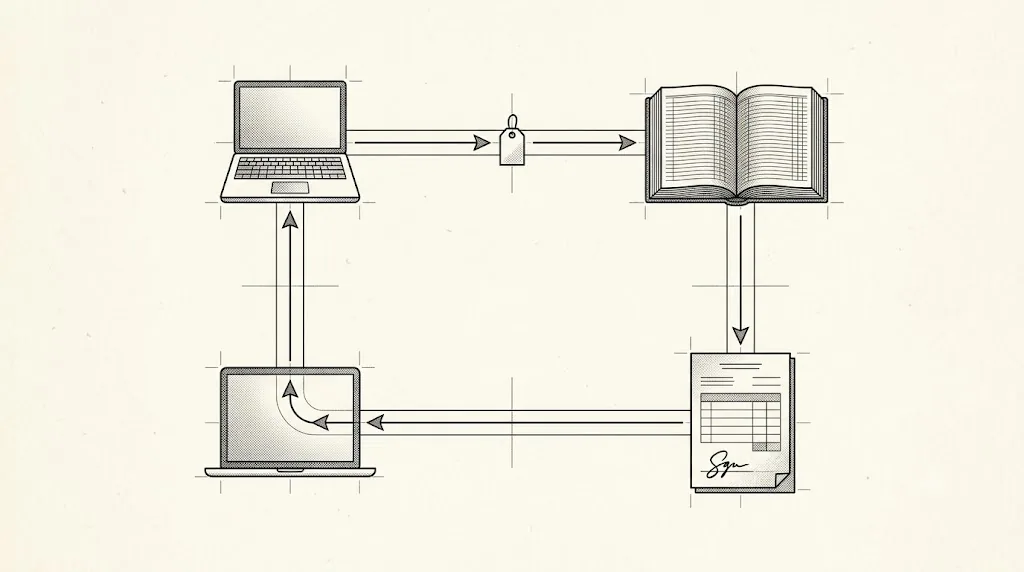
So there are two ways to connect a booked job to the ad that caused it:
- The click ID (GCLID). Captured on your form, stored with the lead in your CRM, sent back when the job books. It is still the most exact match you can send.
- Enhanced conversions for leads. This is now the upgraded version of the old offline import, not just a backup. It sends your own first-party data, like an email or phone number, scrambled before it leaves your system. Google matches it against signed-in Google accounts. Browser privacy changes strip click IDs more often now, so this is the path Google points you to.
Do not treat those as either-or. Google’s own advice is to “include GCLIDs with your uploaded events whenever possible”.[2] Send both when you have both. The click ID makes the match exact, and the contact details catch the leads where the click ID never arrived.
One rule from our own account work saves a lot of matched jobs. Send every row you have, whatever identifier it carries. Some leads have a click ID and contact details. Some have only one. Upload all of them. Google matches on whatever it can, and a row with only an email still counts. Never drop a lead just because it is missing a field.
When should you use offline conversions (and when it’s overkill)?
Use offline conversions once you have steady lead volume and a place to mark leads as booked. If you get a handful of leads a week and track them in your head, this is too early. The moment you have a CRM, a spreadsheet, or a booking system that records outcomes, it is worth doing. The higher your job values, the sooner it pays off.
The honest “not yet” cases are simple. You cannot reliably say which leads booked. Your team does not update lead status. Or you get so few leads that the data would never add up to a signal Google can learn from. Fix those first. Feeding Google half-updated job data is worse than feeding it none, because it teaches the wrong lesson.
For most established home services businesses, the answer is yes, and sooner than you think. If you sell high-ticket work, like pipe relining, a reroof, basement waterproofing, or a full system replacement, the gap between a cheap lead and a booked job is huge. That gap is money Google cannot see until you show it.
How do you set up offline conversion tracking?
Setup has four parts. Create a conversion action for the booked job. Capture the click ID (GCLID) on every lead. Mark leads as booked in your CRM. Then send the booked ones back to Google. You do not need to be a coder for any of this. If your CRM has a Google Ads connector, most of it is switches. If it does not, a spreadsheet and a weekly upload will do the same job.
Step by step:
- Create the conversion action. In Conversions, add a new action for the outcome you care about, usually the booked job. Give it a value, even an average one. If your average reroof is worth $14,000 and your average drain job is worth $400, those are two different actions, not one. It is the same logic that gives each service its own campaign.
- Capture the GCLID. Your contact form needs a hidden field that quietly stores the click ID and sends it through with the lead. Most form tools have this built in, so it is usually a setting to switch on rather than code to write. If yours does not, it is a short job for whoever built your site. Ask them one question: does our form pass the GCLID through to the CRM? For phone leads, your call tracking should capture it.
- Mark the outcome. When a lead books, someone updates its status and, ideally, the job value. This step is a people problem, not a tech one. Give it to the person who already books the work, usually whoever runs the phones or the schedule, and make it part of closing out the job. It takes seconds per lead. It only works if it happens daily, not in a Friday catch-up.
- Send it back. Upload the booked jobs to Google. If your CRM has a Google Ads connector, switch it on and it sends them for you. If not, export your booked leads to a spreadsheet and upload that. The file is plain: one row per booked job, holding the click ID, the date and time it booked, the name of your conversion action, and what the job was worth. Since 15 June 2026, this import runs through Google’s Data Manager API, and the old Google Ads API route for these uploads is blocked.[3] Use a connector or setup built for the Data Manager path. If your CRM or your agency is still on the old route, the uploads are not landing at all. That is a fair question to put to whoever runs your account, and an agency that bids to booked jobs will have the answer ready.
Upload on a set schedule, weekly at least. Send the whole file each time, click-ID rows and contact-detail rows together, so Google matches everything it can.
How does this optimize your bidding to booked jobs?
This is the Clique-to-Close idea in one line. When Google can see booked jobs, it bids for booked jobs. Smart Bidding learns from the outcomes you feed it. Feed it form fills, it finds more form fills. Feed it booked jobs, it finds the searches, keywords, and times of day that produce booked jobs. The whole machine turns toward the number that pays you.
There is a catch that trips up every owner, so hear it now. Your reported cost per lead will probably go up. That is not the tracking breaking. It is the tracking working. Google stops chasing the cheapest leads and starts chasing the ones that book, and booked leads cost more to win. The number that matters, cost per booked job, comes down even as cost per lead rises. Judge the account on jobs, not leads, and check it against what a lead is really worth paying.
Two things make this work harder. First, volume. Bidding steadies as booked jobs add up, so the more you feed back, the faster and calmer it gets. Second, how fast you answer. A booked job only exists if someone picked up and closed it, so the person on your phones is part of this system, not separate from it. This all sits on top of your bid strategy and your attribution model, so how the bidding uses what you feed it and which numbers to judge it on are both worth a read.
What breaks offline conversion tracking (and how to check)?
The usual breaks are lost click IDs, stale uploads, consent gaps, and low match rates. A lost GCLID means Google cannot connect the job to the ad. A stale upload means the outcome arrives after the conversion window closed. A consent gap means the data never got permission to send. A low match rate means Google received the rows but could not tie them to clicks. Each one quietly shrinks the data the bidding learns from.
Run this check every month:
- GCLID capture. Submit a test lead and confirm the click ID lands in your CRM.
- Upload cadence. Confirm files are going up on schedule, and inside the conversion window.
- Match rate. Your upload report tells you how many of the rows you sent Google was able to match. A low number points at missing IDs or bad formatting.
- Consent. Some regions, mainly Europe and the United Kingdom, require you to ask visitors for permission before this data can be sent at all. If you serve those markets, confirm it is set up.
- Enhanced conversions for leads. Confirm it is switched on, so leads with no click ID still match. Since June 2026 this is a single on and off switch covering both web and leads, so there is only one setting to check.
If the match rate is low, go back to capture. Most offline-conversion problems are not upload problems. They start earlier, at the form or the call, where the click ID was never saved in the first place.
Stop reading · start fixingSee where your pipeline is leaking.Free 15-minute Leak Finder. We pull up your numbers, name your biggest leak, and hand you a 90-day plan. No sales script, no hard close.Find My Google Ads LeaksFAQ
What is the difference between offline and online conversion tracking? Online tracking counts actions on your website, like a form fill. Offline tracking counts what happens after, away from the site, like the booked job. Online tells you a lead came in. Offline tells you it turned into money.
How do I notify Google Ads of an offline conversion? You upload it. Capture the click ID (GCLID) with the lead, mark the lead as booked in your CRM, then send that outcome back to Google. Since 15 June 2026, that import runs through Google’s Data Manager API, usually via a connector or CRM integration. The old Google Ads API route for these uploads is closed, so check which one your setup uses.
Can GA4 track offline conversions? GA4 is built around on-site behaviour, so it is not the right tool for feeding booked jobs into bidding. For contractors, import booked jobs into Google Ads directly, through the click ID or enhanced conversions for leads, so the bidding can use them.
Why did my cost per lead go up after I turned this on? Because it is working. Google switched from chasing the cheapest leads to chasing the ones that book, and those cost more to win. Watch cost per booked job instead. That is the number that should fall.
Do I need a CRM to do this? You need somewhere reliable to record which leads booked. A CRM is easiest, but a shared spreadsheet works when you are starting out. The tool matters less than one named person on your team updating lead outcomes, and doing it every week without being chased.


